
Wedding Invitation Card Maker
Galaxy studio appsEvents
4.427.00 Reviews
- Version
- 3.1.1.1
- Installs
- 5.00M
- Age Rating
- Everyone
Screenshots
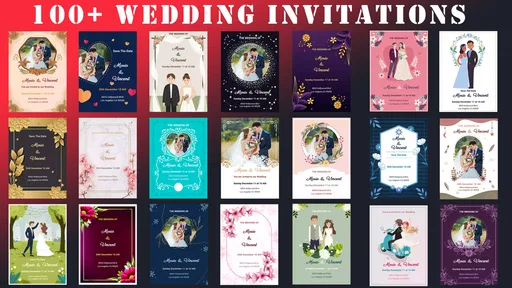
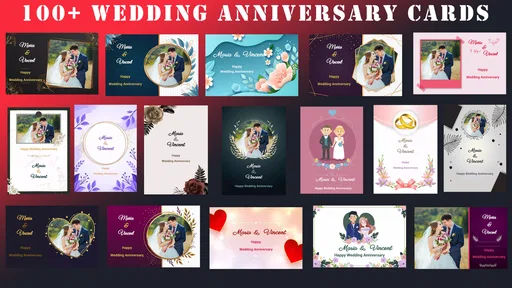
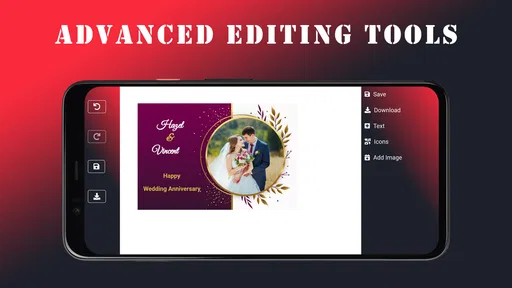
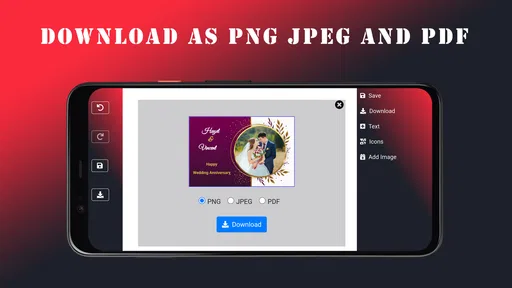
Our Review of Wedding Invitation Card Maker
 Analysis by Appyee
When several people are helping plan a wedding, invitation design can become one more shared task to coordinate. I like that Wedding Invitation Card Maker focuses on making cards on a phone, so someone can try ideas between errands while another person checks the wording or guest details. It is a free events app from Galaxy studio apps, and its mix of wedding invitations and anniversary cards makes it useful beyond a single date. I’d still agree on who is editing the design before passing a device around: a shared screen is convenient, but it can also make it easy to overwrite or lose track of someone’s preferred version.
Making one card work for several helpers
A realistic use for this app is a couple working on an invitation at the kitchen table while a relative offers suggestions. Rather than asking everyone to learn a desktop design program, one person can handle the phone and test a template while the others check names, venue wording, and the overall feel. That division helps keep the creative choices in one place and the factual details under review. I’d treat the app as a card-making workspace, not as a shared planning hub: people still need to agree separately on the final wording and which draft is ready to send.
For household use, the practical boundary is simple: decide whose device and design are being used before making changes. If a family member is helping with a wedding or anniversary card, I’d have them suggest edits rather than freely changing the only version. That is especially useful when two people have different ideas about fonts or colors. A quick screenshot or saved copy, if your usual phone workflow supports it, can make comparison easier before settling on a final design; I wouldn’t assume the app itself provides a collaboration history or shared editing controls.
Keeping the invitation details reliable
The less glamorous part of an invitation is often the most important: names, dates, venue information, and RSVP instructions need to be accurate and readable. I recommend writing the complete wording in a note first, then placing it in the design and checking it line by line. This reduces the chance that a design session turns into repeated edits while guests are waiting for essential information. For a large guest list, I’d also keep response tracking in a separate method that the couple already trusts, rather than assuming a card-making app replaces a full guest-management system.
That distinction matters if multiple relatives are involved. One person can shape the card while another verifies the details against the couple’s final plan. Before sharing, read the invitation as a guest would: is the event clear, is the RSVP request easy to spot, and does the chosen layout leave enough space for the important text? A decorative design can look lovely in a preview and still make practical details harder to notice. I’d prioritize legibility over adding one more embellishment.
Choosing between a phone app and other options
Compared with hiring a designer, a phone-based invitation maker gives you a more direct, hands-on route and avoids making every small change a separate request. Compared with building a card from scratch in a general design tool, ready-made templates can be less intimidating when you simply want a polished starting point. The trade-off is control: someone who needs exact brand-like typography, precise print specifications, or a highly unusual layout may be better served by a full desktop design program or a professional printer’s design service.
It also sits in a different lane from event-planning services. The appeal here is producing a visual invitation, not managing every part of the celebration. If you need a detailed guest database, coordinated reminders, or a central space for several organizers to work together, a dedicated planning tool may fit better. For a couple who mainly needs an attractive card and a straightforward way to share it, this narrower focus can be an advantage rather than a shortcoming.
Age, spending, and a sensible first try
The app is rated Everyone, which makes its age context broad, but I’d still keep an adult involved when a child is helping create a card or using a shared phone. That is ordinary device supervision, not a special family feature. The app is free to install, while optional in-app purchases range from $0.99 to $99.99 per item, so I’d check the purchase prompts before anyone taps through them. If a young relative is decorating an anniversary card, an adult can handle any payment decisions and keep the activity focused on the design.
It has a 4.5 average from around 17,000 ratings and over a million installs, which suggests plenty of people have tried it, but those figures aren’t a substitute for checking whether its style suits your event. The current version is 3.1.1.1, and it requires Android 8.0 or later. I’d start by making a simple draft before spending time polishing details. That first pass shows whether the templates and editing approach match your taste, and it gives you a chance to inspect the wording and preview before deciding whether to continue.
There are a few useful trade-offs to keep in mind. A template speeds up the start, but it can also make different invitations feel familiar if you leave it mostly untouched. A personal photo or carefully chosen colors can make the result feel more like yours, yet too many decorative additions can compete with the event information. I’d choose one visual idea to lead the design, then keep the rest restrained. And if printing matters, check the final file and a small test print before ordering a full batch; screen previews can’t tell you exactly how a particular printer or paper will reproduce the colors.
For a one-off wedding, an anniversary celebration, or a friend who wants help putting together a card without learning complex software, this is the kind of app I’d try first. I’d skip it if I needed advanced layout control, a dependable multi-person editing workflow, or comprehensive guest administration in one place. Its strongest role is helping someone turn a personal idea into a shareable invitation, while the people planning the event remain responsible for coordination and final checks.
Getting Started with Wedding Invitation Card Maker
When I first stumbled upon this app, I was a bit skeptical. Could it really be that easy to make a stunning wedding invite from my phone? Spoiler alert: it is! The installation process is as smooth as a wedding waltz. Just a few taps, and you’re ready to go. Once inside, the interface is super user-friendly. Even if you aren’t a tech wizard, you’ll feel right at home.
Exploring the Features
One of the first things that caught my eye was the vast collection of templates. Whether you're going for a classic vibe, something modern, or a quirky theme, there's a template for you. It’s like having a design studio in your pocket. The customization options are quite impressive too. You can tweak fonts, colors, and even add personal photos. I had a blast experimenting with different styles and watching my ideas come to life.
Another feature worth mentioning is the ability to add RSVP details directly into your invite. This is a game-changer for anyone planning a wedding. The app lets you keep track of responses without the hassle of managing separate spreadsheets or notes. Talk about convenience!
Personalizing Your Invitations
The personalization doesn’t end with templates. The app allows you to add personal touches that reflect the unique story of you and your partner. I spent a good hour playing around with different color palettes and font styles to match my wedding theme. The app even offers a selection of stickers and embellishments to add that extra flair.
One of my favorite aspects? The ability to preview the card as if it were a physical invite. It’s one thing to see your design on screen, but seeing it in a mock-up gives you a better idea of what your guests will experience.
Sharing and Printing Options
Once your masterpiece is ready, sharing it is a breeze. You can send your invites via email or social media directly from the app. If you're old school like me and still love the touch of paper, the app provides high-resolution files ready for printing. I tested this out, and the print quality was top-notch. It’s like having your cake and eating it too!
The Little Extras
Beyond the basics, the app includes some thoughtful extras. There’s a section dedicated to wedding tips and ideas to help keep your planning on track. Plus, the app’s offline functionality means you can work on your invites anytime, anywhere. I found myself drafting ideas during my morning commute without a hitch.
What really sets this app apart is its balance between simplicity and functionality. It doesn’t overwhelm you with too many options, yet it provides enough tools to make your invites truly special. It’s a digital invitation fairy godmother, minus the wand.
Final Thoughts
So, would I recommend the app? Absolutely! Whether you’re a bride-to-be, groom, or just helping out a friend, this app is a fantastic resource for creating beautiful, personalized wedding invitations without the stress. It's a delightful blend of creativity and practicality, and I’m all about that life.
If you’re ready to embark on your wedding invitation journey, give this app a whirl. Who knows? You might just become the next Picasso of wedding invites. Happy planning!
Privacy and Permissions
See what permissions an app requests and how it handles your data.
- Wi-Fi connection information
- view Wi-Fi connections
- Other
- view network connections, full network access, control vibration, prevent device from sleeping, Google Play license check
Verdict
Strengths of Wedding Invitation Card Maker
- User-friendly interface for easy design.
- Wide variety of templates and themes.
- Customizable text and font options.
- Supports high-resolution exports.
- No internet required for basic features.
Limitations of Wedding Invitation Card Maker
- Limited features in free version.
- Some templates feel outdated.
- Ads can be intrusive at times.
- No direct social media sharing.
- Advanced editing tools are lacking.
Other Releases by Galaxy studio apps
View All
GPS Photo: With Location & Map
Travel & Local4.2

ArtFonts: Stylish Text
Personalization4.6

Word Office: Docs Reader
Productivity4.8

Credit Card : Wallet & NFC
Finance4.6
Similar Picks in This Category
View All
Easy Quran Mp3 Audio Offline
Muslim Worldapp4.7

Invitation Maker: Cards & RSVP
Greetings Island4.9

StubHub - Live Event Tickets
StubHub4.3

Fever: Events & Tickets
Fever Labs4.7

Epic Freebie Games Radar
Arioch Pds - Apps & Games4.4

Invitation card Maker, Design
Splendid App Maker4.9
Frequently Asked Questions
What features does the Wedding Invitation Card Maker offer?
The Wedding Invitation Card Maker app offers a range of features including customizable templates, various font styles, and an array of color schemes. Users can add personal photos, choose from a selection of decorative elements, and even include QR codes for RSVPs. The app also allows easy sharing via social media and email.
Is the Wedding Invitation Card Maker app easy to use for beginners?
Yes, the app is designed with user-friendliness in mind. It features an intuitive interface with drag-and-drop functionality, making it accessible for users with no prior design experience. Step-by-step guides and tutorials are available to help beginners navigate the app efficiently.
Can I use my own images and elements in the invitations?
Absolutely! The app allows users to upload their own images and elements, offering a personalized touch to each invitation. You can import photos directly from your device's gallery and integrate them seamlessly into the design, ensuring your invitations are unique and reflective of your style.
What are the pros and cons of using this app?
Pros include a wide variety of customizable templates, ease of use, and the ability to share invitations digitally. Cons may involve occasional in-app advertisements and limited free features, as some premium templates and elements require in-app purchases. Overall, it offers good value for those seeking convenience and creativity.
Is the Wedding Invitation Card Maker app free to download and use?
The app is free to download and use, with a selection of basic templates and features available at no cost. However, there are in-app purchases for premium templates and additional design elements. Users can opt for these paid features for enhanced customization options and more elaborate designs.
